We only list companies that are trustworthy and appropriately licensed. Our aim is to give you a comprehensive view of the regulated money transfer marketplace.
|Disclosure
MoneyTransfers aims to help users find the best money transfer provider for their needs. To support our free service, we may earn a commission from some of the providers listed in our search results. The commission may also impact the ordering of the providers shown. Our reviews are independent from this and are based on our editorial policy, research and testing of dozens of remittance providers on the market.
Table of Contents
I suggest Global66 for peso-funded overseas bank payments, or Davivienda when you already bank there and need a family transfer or cash collection abroad.
BBVA Colombia lets you arrange a foreign-currency bank payment alongside your normal banking, while Bancolombia's Inversiones app serves a separate USD-account use case.
The strongest choices depend on where your money starts, because sending Colombian pesos and spending an existing foreign balance are different tasks.
Search Now & Save On Your Transfer
Instantly view live exchange rates, fees & features.
At a glance
Global66: Peso-funded bank transfers and saved recipients.
Davivienda: Family bank payments or Ria cash delivery from your account.
BBVA Colombia: Foreign-currency payments within your banking app.
App Inversiones Bancolombia: International payments from a Panamá USD account.
Find a rate for transfers from Colombia
Enter your destination and amount to check available COP transfer quotes.
My picks for international transfers
Global66 suits a separate transfer account, while the bank apps make more sense when their account and payment options already fit you.
Peso-funded mobile bank payments
8.2
Global66
Fees
1%
Exchange Rate Markup
1.1 - 2%
Transfer Speed
Minutes - 24 hours
"An exciting, fast-growing global payments company focusing on Latin America. Official fintech partner of FC Bayern Munich and offers a best price guarantee."
Family payments with bank or cash delivery
?
Davivienda
Fees
Exchange Rate Markup
Transfer Speed
Sending from your BBVA account
?
BBVA
Fees
Exchange Rate Markup
Transfer Speed
Paying from your Panamá dollar account
?
Bancolombia
Fees
Exchange Rate Markup
Transfer Speed
Global66
Global66 keeps overseas bank payments and recipient details together
Available on
iOS and Android
App store rating
4.8/5 (23k+ ratings)
Google play rating
4.8/5 (85k+ reviews)
Global66 is my pick for arranging overseas bank payments from Colombian pesos without moving your everyday banking to another bank.
You create your account in the app, complete the requested identity checks and then add your recipient.
You add the destination and recipient's bank details, choose the payment purpose and manage the transfer through your Global66 account.
PSE lets you load pesos from a Colombian bank account, so the funding step stays connected to money you already hold locally.
Your recipient receives the payment into their bank account and does not need to create a Global66 account.
Saved contacts suit repeat payments, while transfer status notifications help you follow the money through to the destination bank.
Payments between Global66 users are a separate option, so I suggest using the bank-transfer route when the recipient needs money in their normal account.
The wider account includes currency conversion and foreign receiving options, but those services have different legal arrangements from the Colombian peso deposit.
Its Colombian electronic deposit is supervised by the Superintendencia Financiera, while international transfer contracts run through Global81 in Chile.
You want all foreign balances covered by Colombian deposit protection
Davivienda
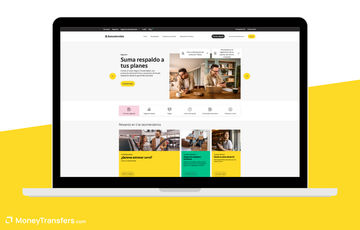
Davivienda gives you bank and cash delivery from the same app
Available on
iOS and Android
App store rating
4.7/5 (350k+ ratings)
Google play rating
4.6/5 (350k+ reviews)
If you already have a Davivienda savings or current account, I suggest trying its app for family payments before opening another transfer account.
You debit your bank balance directly, then arrange an overseas bank transfer or a supported Ria payment for cash collection.
The app keeps your banking and transfer records together, including transaction enquiries and receipts for payments you have already submitted.
That is helpful when a relative needs confirmation of a payment, or you need a record for your own accounts.
The app's international bank function covers family and friends, your own foreign accounts and you can use it for things like travel, education, medical bills and subscriptions.
For a business invoice or any other purpose outside that list, use Davivienda's website or its Mesa de Dinero (don't pick the incorrect reason).
Bank transfers support USD, EUR, GBP, CHF, CAD and JPY, while Ria cash delivery has a separate, smaller destination list.
The Ria routes include the United States, Canada, Spain, the United Kingdom, Australia, Germany and Chile.
You need your active account and virtual password, and the money comes from that account rather than a cash deposit into the phone app.
I like the choice between bank and cash delivery, but it is not a standalone wallet for holding all those foreign currencies.
Bank transfers carry a sending charge plus the cost of currency conversion, with intermediary charges possible on the banking route.
Ria cash payments have their own fees and limits, so the bank-transfer tariff does not tell you what cash delivery will cost.
There is no separate transfer-app subscription to buy, although your bank-account charges still form part of the overall cost.
My suggestion is to choose the receiving method first, then assess the amount your relative gets after the transfer and exchange charges.
Davivienda is worth it
Find an alternative
Send from your existing Davivienda balance
You do not want a Davivienda bank account
Choose supported Ria cash collection
You need cash delivery outside its app routes
Keep transfer records with everyday banking
Your payment purpose is outside the app function
BBVA Colombia
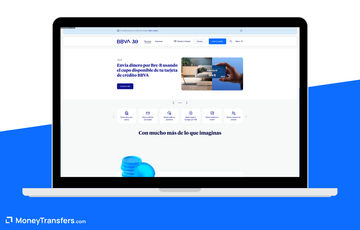
BBVA lets you manage foreign payments alongside your bank account
Available on
iOS and Android
App store rating
4.8/5 (98k+ ratings)
Google play rating
4.7/5 (410k+ reviews)
If BBVA is already your bank, its foreign-currency function lets you send abroad without funding a separate money-transfer wallet.
You select the amount and payment purpose, enter the recipient's bank details and authorise a payment from your BBVA account.
The same app provides account movements, statements and card controls, so you can manage the payment alongside the account funding it.
Biometric login also helps with routine access, although you still need to complete the bank's transaction authorisation and requested documents.
In my opinion, it suits bank-account delivery, rather than family cash collection or a recipient's mobile-money wallet.
Its foreign-currency dealing hours run from 06:00 to 14:00 and 15:00 to 20:00, so this is not an unrestricted round-the-clock FX service.
The app supports foreign-currency transactions up to its monthly USD50,000-equivalent limit, while larger operations use BBVA Net.
This is the bank's channel limit, rather than a universal legal ceiling on sending money from Colombia.
BBVA sets the exchange rate, and sending charges or intermediary deductions can add to the conversion cost.
Downloading the app does not remove the costs of your bank account, so include those alongside the individual transfer quote.
I suggest it when keeping the payment within BBVA saves administration, but you should compare the final recipient amount before making it your regular route.
BBVA Colombia is worth it
Find an alternative
Send from the account you already use
You need cash or mobile-wallet delivery
Manage statements and card controls together
You need to arrange FX outside dealing hours
Keep bank payments inside BBVA
Your payment exceeds the app channel limit
App Inversiones Bancolombia
App Inversiones lets you pay abroad from a Panamá dollar account
Available on
iOS and Android
App store rating
2.5/5 (110+ ratings)
Google play rating
2.6/5 (500+ reviews)
My suggestion is to use App Inversiones for an existing Bancolombia Panamá dollar account, rather than open that account just to make one peso-funded transfer.
The account is available to eligible Colombian nationals resident in Colombia, and operates under Bancolombia Panamá's banking licence.
International sending debits that foreign account, so moving Colombian pesos into it is a separate transaction with its own conversion and transfer costs.
Within the app, you can add an overseas beneficiary, enter their bank details and arrange a payment from your dollar balance.
The payment flow includes the receiving currency and cost allocation, with the dynamic key used to authorise the instruction.
That gives you more control over a foreign bank balance than using a domestic wallet that only receives remittances into pesos.
The account holds USD rather than a full set of currencies, so I would not describe it as an everyday multi-currency wallet.
The app also brings together balances and statements for supported investment and foreign-subsidiary products, which adds value when you already manage those accounts.
Its ratings are substantially lower than the other apps here, so I suggest another option if stronger user feedback is a priority.
International payment costs depend on the bank tariff, exchange and charge allocation, with intermediary-bank costs separate from downloading the app.
An OUR instruction puts more charges on the sender, while SHA shares charges with the receiving side.
I suggest retaining it for paying from money already held in that USD account, rather than treating offshore account funding as a shortcut to cheap COP transfers.
App Inversiones Bancolombia is worth it
Find an alternative
Pay from your Panamá USD account
You want direct PSE-funded peso sending
Register overseas recipients within the app
You need several everyday currency balances
Manage foreign account records together
You prioritise stronger app-store feedback
Revolut is preparing to launch in Colombia
Revolut received its Colombian banking licence in September 2026 and is preparing to launch its local service.
You can join the waiting list now, while full customer signup is still pending.
Cheapest apps for sending money from Colombia
My suggestion is to compare the final recipient amount for your destination, because a low sending fee can be outweighed by the exchange rate.
Global66 provides peso-funded online quotes, while the bank apps have their own tariffs and exchange prices outside these live results.
Last updated at 11/05/2026
COP USD
Mid Market Rate$1 = $0.0003$1 = $0.0003
Transfer Amount$4,000,000$12,000,000
1
Revolut
2
Global66
1
Revolut
2
Global66
Currency pair
They get (after fees)
Transfer fees
FX Rate
Markup
Delivery time
Cheapest payment method
COP / USD
$1,218.74
$24,000.00
0.0003
3.16%
Same day
Bank transfer
COP / USD
$1,209.93
$100,000.00
0.0003
3.16%
Minutes - 24 hours
Bank transfer
COP / USD
$3,649.46
$104,000.00
0.0003
3.16%
Same day
Bank transfer
COP / USD
$3,629.79
$300,000.00
0.0003
3.16%
Minutes - 24 hours
Bank transfer
COP EUR
Mid Market Rate$1 = €0.0003$1 = €0.0003
Transfer Amount$4,000,000$12,000,000
1
Revolut
2
Global66
1
Revolut
2
Global66
Currency pair
They get (after fees)
Transfer fees
FX Rate
Markup
Delivery time
Cheapest payment method
COP / EUR
€1,082.43
$24,000.00
0.0003
-8.70%
Within minutes
Bank transfer
COP / EUR
€1,067.78
$124,000.00
0.0003
-8.70%
Minutes - 24 hours
Bank transfer
COP / EUR
€3,240.91
$104,000.00
0.0003
-8.71%
Within minutes
Bank transfer
COP / EUR
€3,203.73
$372,000.00
0.0003
-8.71%
Minutes - 24 hours
Bank transfer
COP GBP
Mid Market Rate$1 = £0.0002$1 = £0.0002
Transfer Amount$4,000,000$12,000,000
1
Revolut
2
Global66
1
Revolut
2
Global66
Currency pair
They get (after fees)
Transfer fees
FX Rate
Markup
Delivery time
Cheapest payment method
COP / GBP
£903.40
$24,000.00
0.0002
13.74%
Within minutes
Bank transfer
COP / GBP
£892.37
$120,000.00
0.0002
13.74%
Minutes - 24 hours
Bank transfer
COP / GBP
£2,705.06
$104,000.00
0.0002
13.73%
Within minutes
Bank transfer
COP / GBP
£2,685.40
$324,000.00
0.0002
13.73%
Minutes - 24 hours
Bank transfer
COP MXN
Mid Market Rate$1 = $0.0058$1 = $0.0058
Transfer Amount$4,000,000$12,000,000
1
Revolut
2
Global66
1
Revolut
2
Global66
Currency pair
They get (after fees)
Transfer fees
FX Rate
Markup
Delivery time
Cheapest payment method
COP / MXN
$22,575.14
$24,000.00
0.0057
0.87%
Within minutes
Bank transfer
COP / MXN
$22,055.61
$172,000.00
0.0058
-0.87%
Minutes - 24 hours
Bank transfer
COP / MXN
$67,614.58
$104,000.00
0.0057
0.90%
Within minutes
Bank transfer
COP / MXN
$66,184.83
$516,000.00
0.0058
-0.84%
Minutes - 24 hours
Bank transfer
COP CLP
Mid Market Rate$1 = $0.2989$1 = $0.2989
Transfer Amount$4,000,000$12,000,000
1
Revolut
2
Global66
1
Revolut
2
Global66
Currency pair
They get (after fees)
Transfer fees
FX Rate
Markup
Delivery time
Cheapest payment method
COP / CLP
$1,172,348.00
$24,000.00
0.2949
1.36%
Within minutes
Bank transfer
COP / CLP
$1,155,006.00
$148,000.00
0.2998
-0.29%
Minutes - 24 hours
Bank transfer
COP / CLP
$3,510,550.00
$104,000.00
0.2951
1.29%
Within minutes
Bank transfer
COP / CLP
$3,465,019.00
$444,000.00
0.2998
-0.29%
Minutes - 24 hours
Bank transfer
COP PEN
Mid Market Rate$1 = PEN 0.0011$1 = PEN 0.0011
Transfer Amount$4,000,000$12,000,000
1
Revolut
2
Global66
1
Revolut
2
Global66
Currency pair
They get (after fees)
Transfer fees
FX Rate
Markup
Delivery time
Cheapest payment method
COP / PEN
PEN 4,177.48
$24,000.00
0.0011
-2.90%
Within minutes
Bank transfer
COP / PEN
PEN 4,111.30
$160,000.00
0.0011
-2.90%
Minutes - 24 hours
Bank transfer
COP / PEN
PEN 12,509.36
$104,000.00
0.0011
-2.90%
Within minutes
Bank transfer
COP / PEN
PEN 12,333.90
$480,000.00
0.0011
-2.90%
Minutes - 24 hours
Bank transfer
COP USD
Mid Market Rate$1 = $0.0003$1 = $0.0003
Transfer Amount$4,000,000$12,000,000
1
Global66
2
Revolut
1
Global66
2
Revolut
Currency pair
They get (after fees)
Transfer fees
FX Rate
Markup
Delivery time
Cheapest payment method
COP / USD
$1,228.54
$40,000.00
0.0003
3.16%
Minutes - 24 hours
Bank transfer
COP / USD
$1,218.74
$24,000.00
0.0003
3.16%
Within minutes
Bank transfer
COP / USD
$3,685.63
$120,000.00
0.0003
3.16%
Minutes - 24 hours
Bank transfer
COP / USD
$3,649.46
$104,000.00
0.0003
3.16%
Within minutes
Bank transfer
For regular transfers, make sure to compare the total cost and delivery amounts.
Choosing an app for Colombian pesos or a foreign balance
Start with the money you actually have
A Colombian peso bank balance makes PSE funding or a direct debit from your own bank account the relevant starting point.
An app accepting dollars from a foreign bank is a different option, because obtaining and sending those dollars can add another layer of cost.
I would not open a foreign account simply because the eventual transfer app has a low fee, without including that initial funding step.
Choose the receiving method before downloading
For an overseas bank payment, collect the recipient's account details and the identifier their bank uses, such as SWIFT, IBAN or ABA.
Davivienda's Ria function adds cash collection on its supported routes, while Global66 and the bank-payment options focus on account delivery.
If cash delivery is essential and the app route does not cover it, Western Union through Banco Unión is another route to assess.
Domestic wallets solve a different problem
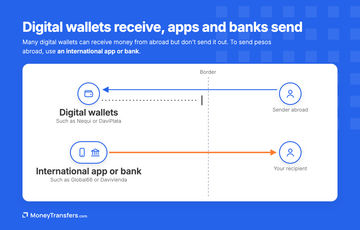
Nequi and DaviPlata fit local peso payments and supported incoming remittances, but receiving from abroad does not establish overseas sending from the same wallet.
For a payment within Colombia, use the local transfer function that fits the recipient instead of paying for an international conversion.
For international payments, I suggest focusing on the app's actual outbound function and the receiving country.
How to send abroad through an app from Colombia
Match the app to your funding account
Choose a peso-funded route from your Colombian account, or use an eligible foreign-account app when the money is already held there.
Add the recipient and payment purpose
Enter the receiving bank or collection details, then select the purpose that accurately describes why you are sending the money.
Check the final amount and charges
Review the recipient amount, exchange rate and sending charges, including any bank cost allocation before you confirm the payment.
Authorise the transfer and retain the receipt
Complete the app's security checks, then save the receipt and use the transaction record to follow progress.
Which protection applies to your app?
Davivienda and BBVA operate as Colombian banks, while the Panamá dollar account belongs to Bancolombia's separately supervised foreign banking entity.
Global66's Colombian peso deposit and its international services use different entities, so Colombian deposit protection does not extend automatically to every product in the app.
I suggest downloading through the official bank or provider link and using its support channel if the recipient details or transaction record look wrong.
Enter your destination and COP amount below to compare available transfer prices from Colombia before choosing how to send.
Compare transfers from Colombia
Enter your destination and amount to compare available COP transfer fees, exchange rates and recipient amounts.
Our methodology & why trust us
I assessed apps usable for sending from Colombia by funding, receiving methods, transfer controls, account functions, pricing and local eligibility.
Our live results helped identify quoted COP routes, with official product checks separating actual outbound apps from inbound-only wallets and web-only services.
Four apps met the verified use cases here, including one narrower foreign-dollar-account option rather than a forced fifth pick.
The shortlist includes local bank apps and a separately funded dollar-account option, with account requirements considered alongside transfer features.
Our review process explains how we assess providers and transfer options.









Please share your experience with …