
AI Assistant for International Money Transfers
Table of Contents

Author: Artiom Pucinskij
Table of Contents
Ask ChatGPT, Claude or your favorite AI tool where to send money, and get live rates and fees from our comparison, ranked from the cheapest.
Our AI assistant is live on ChatGPT plugin store and coming soon to Claude, with Gemini, Grok and other AI tools to follow.
Why we built an AI assistant
More and more people now ask AI tools where to send money, the same way they used to (and many still do) search on Google.
The problem is that AI tools can't see today's exchange rates or fees, so they answer from old web pages and often get the numbers wrong (which is the critical part).
A rate that's off by 1% on a $2,000 transfer is $20 your family doesn't get, and the answer in the chat won't tell you that.
Do this 12 times a year, and $240 is lost in hidden fees.
So we connected our comparison engine to the AI tools you already use, giving you the same live rates and fees we compare on MoneyTransfers.com, over 1,000 times a day, every day.
All you need to do, is ask how you always would, and you get a live comparison right inside the chat, without opening ten tabs or checking each company yourself.
What you see when you ask
Tell your AI assistant where you're sending money from, where it's going and how much, and it shows you every company with a live price for that transfer.
We partner with the biggest brands in the industry
We work with the biggest and most familiar brands, including Wise, Revolut, Western Union, MoneyGram, Remitly, TapTap Send, and many more.
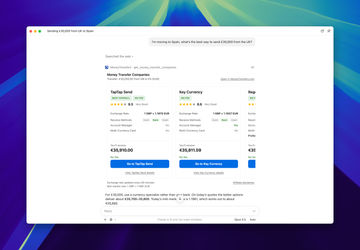
Each result shows:
What your recipient gets, after the fee and the exchange rate
The exchange rate and the transfer fee
Our rating out of 10, from our hands-on reviews
How the money can arrive (bank, card or cash)
Key features, like an account manager or a multi-currency card
Results are always ranked by what your recipient gets, so the cheapest option is at the top.
Sponsored listing
There are no sponsored places in the AI assistant (unlike in our live results here), so the order only changes when the prices do.
Mid-market rate
Under the results, you'll see the mid-market rate (the real exchange rate), so you can see how far each company's rate is from it.
We refresh the mid-market rate every 60 seconds.
Companies & commission
From there, you can go straight to the company's website, read our review first, or open the full comparison on MoneyTransfers.com.
For full transparency, we may receive a small commission when you click on the provider buttons. This does not affect the order in which we show them.
The AI assistant only shows companies that send us live prices (the ones with a green lock on our site).
Companies we price ourselves, with estimated rates, are left out (for now), so open the full comparison on MoneyTransfers.com to see every option.
What the AI assistant doesn't do
It can't send money for you, so you make the transfer yourself with the company you pick, on their website or app.
It doesn't see your bank account, your ID or your accounts with any company, only the amount, countries and currencies you ask about.
It compares personal transfers only for now, so for business payments, use the .
Ask it like you'd ask a friend
You don't need special commands or the right words, just ask, write, or say the way you'd ask someone who knows money transfers.
These are real questions people have asked, and we have already answered.
Sending money to family
"I need to send money to my family abroad, what's the best app?"
"Which providers offer the lowest cost usd to zar transfers for sending family support monthly?"
Finding the cheapest way
"What is the cheapest way to send money from italy to the philippines?"
"How much does it cost to send money to saint kitts and nevis?"
Comparing companies you've heard of
"Wise vs remitly for us to dominican republic transfers"
"Dors paypal work for gettjng few hundred dollsrs to u.s. frim pakistan"
Larger or regular transfers
"For monthly usd to nzd conversions under nzd 10,000, which providers have the lowest total cost?"
"I need to convert kwd to usd for a one-off property deposit, which providers handle large kwd transfers?"
Sending from your bank account
"Can i send money from my german bank account to a turkish bank?"
Typos and half sentences are fine, and if something is missing (like the amount), your assistant will usually ask you before it searches.
For the most accurate results, include where you're sending from, where the money is going and how much you want to send.
Sending euros
If you only say euros, it uses Spain as the sending country and tells you, so name your country to get exact prices.
How to add it to your AI assistant
Adding it takes about a minute, and you don't need a MoneyTransfers.com account to use it.
The steps are the same on your phone and your computer, since you add it once to your AI account and it works everywhere you're signed in.
ChatGPT (live now!)
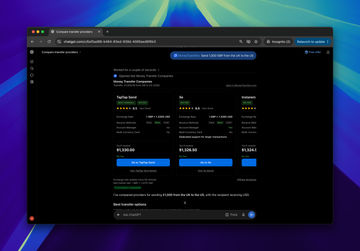
Open ChatGPT and go to Plugins
Search for "MoneyTransfers" and open our app
Click "Install plugin" and confirm
Start a new chat and type @MoneyTransfers, followed by your question
Once it's connected, ChatGPT can also bring it in by itself when you ask about sending money abroad.
It works on ChatGPT's free plan too, so you don't need a paid subscription to use it.
Claude (coming soon)
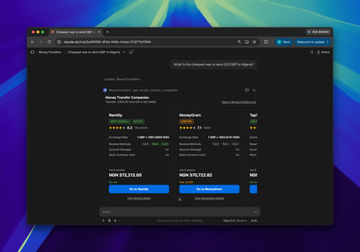
Open Claude and go to Settings, then Connectors
Click “Browse connectors”
Search for “MoneyTransfers” and open it
Click “Connect” (you don’t need to sign in to anything)
Start a new chat and ask your question
Gemini, Grok and other AI tools (coming soon)
We're adding the AI assistant to more AI tools, and we'll add the steps here as each one goes live.
Powered by our MCP server
The AI assistant runs on our own MCP server, which is how one product can work inside ChatGPT, Claude and other AI tools at once.
MCP (Model Context Protocol) is the common standard AI tools use to connect to outside data, a bit like one plug that fits every socket.
Each AI tool plugs into the same server, so you get the same live comparison wherever you ask.
We're opening our MCP server to the public soon, so developers and businesses can add our live money transfer comparison to their own AI agents and apps.
If you'd like to use it when it launches, email us at partnerships@moneytransfers.com.
Where do we come in?
The AI tool handles the conversation, and everything in the results comes from MoneyTransfers.com.
We built it in-house, with the same small team that has been comparing, testing money transfer companies with real money, and giving you answers since 2019.
It's the same comparison engine behind our website and our currency converter app, so you get the same live prices you'd see in a search on our site.
The AI doesn't decide who's cheapest or move anyone up the list, our data does, using the same ranking we explain in how we review.
We still write every review and guide ourselves, as set out in our editorial policy, and the AI assistant doesn't change that.
If you want to go further, every result links back to our full review and the complete comparison, where you can filter results, save searches, set up rate alerts, and use all our features.
Questions
Is the AI assistant free?
Yes, it's free to use, the same as every comparison on MoneyTransfers.com, and you don't pay us anything when you send money.
Is the rate I see the rate I'll get?
The prices are live when you ask, but the company confirms the final rate when you make the transfer, and it can move in the meantime.
Where a company doesn't send us the amount your recipient gets, we work it out from the rate they send us for your search.
What happens to what I type?
The AI tool only sends us the details of your search (the amount, countries and currencies), and your chat stays with the AI tool under its own privacy policy, while what we receive is covered by our privacy policy.
Can I save searches or set rate alerts from the chat?
Not yet, so open the full comparison on MoneyTransfers.com to save a search, shortlist companies or set up a weekly rate alert.
Something looks wrong, how do I tell you?
Email us at contact@moneytransfers.com with the question you asked and what you saw, and we'll check it against our data.
Contributors

Please share your experience with …