
Africhange Review: Exchange Rates, Fees & Transfer Options

Author: Artiom Pucinskij
On this page
Africhange is a money transfer service focusing on Africa remittances, with strong support for Nigeria (NGN).
It is one of only money transfer companies that support transfers from Nigeria (NGN) to a number of destinations.
Africhange does not charge international transfer fees on most routes.
Instead, costs are built into the exchange rate which is often competitive, transparent, and confirmed before you send
For example, sending £200 to Nigeria delivers ₦399,000 with Africhange, compared to ₦396,874 with Wise and ₦396,269 with WorldRemit.
Keep reading to learn how Africhange compares on rates, speed, limits, safety, and features, and whether it’s right for your transfers.
Exclusive rates for new customers
Africhange offers exclusive exchange rates on your first 3 transfers from GBP, NGN, and CAD. Maximum transfer limits apply.
Is Africhange right for you?
Africhange is best for transfers from Nigeria, since hardly anyone offers these transfers.
Africhange is good if… | Find an alternative if… |
|---|---|
|
|
Scoring Africhange
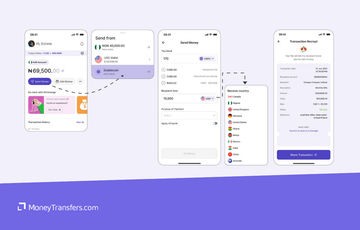
The key areas of our Africhange review are focused on the fees & exchange rates, transfers limits & speed, product offering, ease of use, safety and customer feedback.
Below is a quick summary of Africhange. Each area is covered in more detail below.
Before you choose whether to transfer funds overseas with Africhange, here’s a quick summary of benefits and drawbacks.
- Strong support for NGN transfers, which are hard to find elsewhere
- Many routes have competitive exchange rates, often close to or better than the mid-market rate
- Fast transfers, with many completing within minutes
- Multiple funding options including Interac, bank transfer, and crypto
- Useful for both personal and business transfers involving Africa
- High FX markup when sending money from NGN
- Customer support can be slow or inconsistent during issues
- Wallet balances are not protected by deposit insurance
- Limited currency coverage compared to global-first providers
Africhange fees and exchange rates
Provider
Exchange rates
Just like many other top money transfer companies, Africhange charges a markup on top of the interbank exchange rate.
This means they add a small percentage to the real exchange rate, and the difference they make is their profit.
On average, you can expect to get almost an interbank exchange rate, and in some cases even better.
The only exception is transfers from NGN, which come with 3% markup.
This is often known as the hidden fee because you don’t actually know how much you are overpaying.
But we did our homework and looked at all the exchange rates offered and worked out the difference:
From | To | Africhange Rate | Mid-market rate | FX markup |
|---|---|---|---|---|
AUD | USD | 0.663515 | 0.6635 | 0.00% |
AUD | CAD | 0.912489 | 0.9123384 | 0.02% |
AUD | GBP | 0.494285 | 0.494315 | -0.01% |
AUD | GHS | 7.9 | 7.62929456 | 3.43% |
AUD | KES | 85.427644 | 85.425625 | 0.00% |
AUD | NGN | 980 | 963.766925 | 1.66% |
CAD | UGX | 2588.526353 | 2588.834424 | -0.01% |
CAD | AUD | 1.095904 | 1.09602 | -0.01% |
CAD | CAD | 1 | 1 | 0.00% |
CAD | GBP | 0.541689 | 0.54179 | -0.02% |
CAD | EUR | 0.617953 | 0.618005 | -0.01% |
CAD | KES | 93.620459 | 93.63150625 | -0.01% |
CAD | USD | 0.727148 | 0.727235 | -0.01% |
CAD | GHS | 8.5 | 8.362155281 | 1.62% |
CAD | NGN | 1065 | 1056.345199 | 0.81% |
GBP | UGX | 4724.825 | 4780.549 | -1.18% |
GBP | USD | 1.342372 | 1.342295 | 0.01% |
GBP | AUD | 2.023123 | 2.02349 | -0.02% |
GBP | CAD | 1.846077 | 1.845745 | 0.02% |
GBP | KES | 171.2375 | 173.1651 | -1.13% |
GBP | GHS | 15.96 | 15.44345 | 3.24% |
GBP | NGN | 1995 | 1949.86 | 2.26% |
NGN | UGX | 2.39 | 2.450746618 | -2.54% |
NGN | NGN | 1 | 1 | 0.00% |
NGN | GBP | 0.000492610837 | 0.0005128573 | -4.11% |
NGN | EUR | 0.000558659218 | 0.0005849321 | -4.70% |
NGN | KES | 0.084745763 | 0.0886372242 | -4.59% |
NGN | GHS | 0.008 | 0.0079161199 | 1.05% |
NGN | AUD | 0.00101010101 | 0.001037439 | -2.71% |
NGN | CAD | 0.000892857143 | 0.0009466387 | -6.02% |
NGN | USD | 0.000662251656 | 0.00068844446 | -3.96% |
USD | NGN | 1470 | 1452.55 | 1.19% |
USD | USD | 1 | 1 | 0.00% |
USDC | USD | 1 | 1 | 0.00% |
USDC | NGN | 1470 | 1452.55 | 1.19% |
USDT | NGN | 1470 | 1452.55 | 1.19% |
USDT | USD | 1 | 1 | 0.00% |
*Data and FX rates collected in December 2025 directly from Africhange website. Negative values mean a worse rate than the interbank rate.
Generally speaking, Africhange’s FX rates are great, and in many cases are similar to, if not better than the ones offered by the industry giants like Wise and WorldRemit.
Africhange is also great for transfers from Nigeria.
Not because their rates are good, but because it is extremely rare for companies to facilitate these transfers, meaning you don’t really have much choice.
The FX rates are high, but still better than using your bank (and chances are your bank won’t be able to facilitate it).
International transfer fees
Most Africhange transfers do not have additional international transfer fees on most routes.
Less common corridors may incur a small fee, which will be presented at the time of transfer.
Instead, Africhange makes its money through the exchange rate spread (above), meaning the cost of the transfer is built directly into the rate you receive.
In a few cases there may be additional fees involved, mainly for withdrawals from the virtual wallet.
To put these numbers into perspective, let’s assume you’re making a £200 transfer from the UK to a bank via bank transfer:
Country | Africhange received | Wise received | WorldRemit received |
|---|---|---|---|
✅ 399,000.00 | 396,874.00 | 396,269.00 | |
✅ 3,192.00 | 3,032.02 | 3,087.36 | |
✅ 34,247.50 | 33,875.00 | 33,502.00 |
Transfer speed
Provider
Most Africhange transfers are processed within minutes, typically taking around 10 - 30 mins to complete.
However, this does not include any delays with your bank.
Occasionally banks may flag transactions for verification purposes, which may slow down the transfer (sometimes up to 3 days).
Transfer limits
Provider
Africhange has monthly transfer limits, and no daily or weekly limits.
Transfer limits depend on the account tier you have.
Two tiers are based on unverified (Tier 1) and verified (Tier 2) users.
If you have a Tier 2 account (verified), you can send up to 100 million NGN per month (~68,800 USD).
Product offering
Provider
Supported currencies & destinations
Africhange is mainly popular for transfers to and from Africa.
With Africhange you can convert the following currencies:
USD
CAD
NGN
GBP
AUD
USDT
USDC
To these currencies:
UGX
USD
AUD
CAD
KES
GHS
NGN
If you need to send or receive another currency, we suggest running a quick comparison using the form below.
Compare live money transfer deals
Fill in the form below to get live deals and the best exchange rates for your needs.Payment methods
Africhange offers a few deposit methods, including:
Interac e-Transfer (CAD)
You can fund your CAD wallet by sending an Interac e-Transfer from your Canadian bank using details provided by Africhange. Deposits are usually credited quickly once the transfer is accepted, though timing depends on the bank.
Interac auto-deposit (CAD)
This is a one-time setup that allows CAD deposits to be credited automatically without security questions. After activation, funding is faster and more seamless for repeat deposits.
NGN bank transfer (virtual account)
Africhange creates a virtual Nigerian bank account after BVN verification, allowing you to fund your NGN wallet via local bank transfers. Once set up, deposits work like standard domestic transfers and are typically very fast.
Bank transfer (virtual account)
You can fund your virtual wallet by sending money from your bank account to your virtual USD account details.
Crypto deposits (USDC & USDT)
Africhange allows funding the USD wallet using stablecoins by sending USDC or USDT to a generated wallet address. Crypto deposits depend on blockchain confirmation times and are irreversible if sent to the wrong address or network.
Receiving methods
Africhange allows you to receive money from multiple sources, including personal transfers, businesses, and other Africhange users.
Wallet-to-wallet (Africhange P2P)
You can receive money directly from other Africhange users through internal wallet transfers. These transfers are typically instant, free, and credited directly to your wallet balance.
Bank transfers (virtual accounts)
Africhange provides virtual bank accounts (such as NGN and USD) that can receive transfers from yourself, family members, employers, and supported platforms.
Funds are credited to your wallet once the incoming transfer is completed, with timing depending on the sending bank.
Business & platform payments (USD virtual account)
The virtual USD account can receive payments from approved businesses, employers, and international platforms. Once received, funds are available in your wallet and can be withdrawn to a linked bank account.
Withdrawals to bank accounts
Funds received in your Africhange wallet can be withdrawn to your linked local bank account, depending on the wallet currency and country. Processing times vary by payout method and banking network.
Mobile app
Africhange’s mobile app is generally well-rated across platforms, with a 4.6/5 rating from ~1100 reviews on iOS and a 4.2/5 rating from 1.16k reviews on Google Play.
Most reviews highlight fast transfers, competitive exchange rates, and responsive customer support, while negatives tend to focus on onboarding issues, verification delays, or occasional transaction holds.
In terms of features, the app supports:
Sending and receiving money
Multi-currency wallets (including GBP and NGN)
Referral rewards
Transfer tracking
Real time notifications
Fund wallets
Monitor exchange rates
Manage transactions
The app is also actively maintained, with frequent updates introducing new features like crypto wallet funding, GBP accounts for UK users, Apple Pay support, performance improvements, and security updates.
Business account
Africhange also offers a business account for international business money transfers.
It is aimed at licensed businesses (around the world) and entrepreneurs in Nigeria who need a reliable way to send and manage international payments.
Africhange Business supports cross-border transfers between Canada, Nigeria, and Ghana, with access to major currencies including CAD, NGN, USD, GBP, and EUR.
Business users get access to a multi-currency wallet, transaction histories, downloadable receipts, and other business features.
To get access, you can contact the support after having your personal account verified.
This is a great option if you’re running a business from Nigeria or deal with NGN transfers. Otherwise, I’d suggest Wise Business, Equals Money, or Airwallex.
Ease of use
Provider
Customer service
If you ever need to contact the support or have any issues, you can reach them via:
Live-chat on the app or web
Call or Text at +1(672)9060892
Email at support@africhange.com
Use social media DMs
Safety and trust
Provider
Legitimacy & regulation
Africhange is a legitimate, regulated money service business operating out of Canada (with other entities in the various locations).
The company, Africhange Technologies Limited, is registered with the Financial Transactions and Reports Analysis Centre of Canada (FINTRAC) as a Money Service Business (MSB), under registration number M19773759, and is also licensed in Québec by Revenu Québec (Licence number: 12705).
This means Africhange is legally authorised to provide foreign exchange, money transfer, and virtual currency services, and is subject to ongoing regulatory oversight, reporting requirements, and anti-money laundering obligations under Canadian law.
Customer funds
Africhange wallets are not bank accounts, and balances do not earn interest.
Funds held in wallets are used strictly for facilitating transfers and currency exchange, rather than for lending or investment activities.
As a regulated MSB, Africhange is required to follow strict rules around transaction monitoring, record keeping, and the lawful handling of customer funds.
However, funds are not covered by deposit insurance (such as CDIC protection in Canada), which is standard for non-bank remittance providers.
Compliance, KYC & AML controls
Africhange applies mandatory Know Your Customer (KYC) and Anti-Money Laundering (AML) checks for both personal and business users.
This includes identity verification, sanctions screening, politically exposed person (PEP) checks, and ongoing transaction monitoring.
For business accounts, additional Know Your Business (KYB) checks are required.
Customer feedback
Provider
Africhange has a 4.1 out of 5 rating on Trustpilot, based on 24 reviews.
This is not much to go over, but whenever I see high ratings and a small number of reviews, I naturally start questioning the validity of it.
Most recent reviews are very positive, with many frequently mentioning fast transfers and competitive exchange rates, though there are a few negatives relating to delayed transactions.
In general, here’s a roundup of what other users are saying about Africhange:
- Fast transfer speeds, with many transfers completing within minutes
- Strong exchange rates, often described as “better than competitors”
- Ease of use, particularly the app’s simple interface
- Responsive customer support when issues are resolved smoothly
- Reliability for regular users, especially long-term customers sending money home
- Delayed or “stuck” transactions, especially during busy periods or emergencies
- Poor communication during issues, with some users reporting slow or unclear responses
- Perceived rate changes or cancellations, leading to trust concerns for a small number of users
As you can see, generally users are not happy with the customer service.
Unfortunately, even money transfer giants like Revolut and Wise have issues with it, to the point that it’s just getting worse over time.
From 100s of money transfer reviews I wrote, customer service is the usual pitfall in most cases.
Opening an account with Africhange
To open an account with Africhange, you will need the following:
A valid email address and mobile phone number
A government-issued photo ID (such as a passport or national ID)
Personal details that match your identity documents
A smartphone with a working camera (BVN may be required for NGN wallets)
Once you have these details, follow the steps below to open an account:
Download the Africhange app
Download the Africhange mobile app from the App Store or Google Play.
Create your account
Sign up using your email address and phone number, then verify your email to continue the registration process.
Complete identity verification (KYC)
Upload your identity documents and complete the in-app verification process. Africhange may request additional details to meet regulatory requirements.
Set up your wallet
Once verified, you can create and access your available currency wallets and add any required bank details.
Start using Africhange
After your account is approved, you can fund your wallet, send money, or receive transfers through the app.
Making international transfers
To send money with Africhange, you will need the following:
A verified Africhange account
Sufficient balance in your wallet (CAD, NGN, USD, or supported currency)
Recipient details (bank account details or Africhange user, depending on transfer type)
The amount you want to send and destination currency
Sending money abroad
Once you have all the details ready, you can send money with Africhange by following the steps below:
Select “Send Money”
Open the Africhange app and choose the Send Money to begin a transfer.
Choose currencies and destination
Select the currency you are sending from and the currency you want the recipient to receive, then choose the destination country.
Enter recipient details
Provide the recipient’s bank details or select an existing recipient. For P2P transfers, you can send directly to another Africhange user.
Review exchange rate and fees
Africhange will show you the exchange rate and final amount the recipient will receive before you confirm the transfer.
Confirm and send
Confirm the transaction to complete the transfer. Most transfers are processed quickly, though timing can depend on banking networks and destination.
Canceling transfer
Once a transfer has been submitted, it cannot usually be canceled. In some cases, Africhange may attempt a reversal, but this is not guaranteed.
If you’ve made a mistake, contact Africhange support ASAP and they might be able to help.
Receive international transfers
Africhange allows you to receive international transfers directly into your virtual wallet, making it easy to accept money from abroad without needing a traditional foreign bank account.
Funds can be received from yourself, family and friends, businesses, employers, and supported international platforms.
To receive money, you simply need an active and verified wallet in the relevant currency (such as NGN, CAD, or USD).
Senders use your provided wallet or virtual account details, and once the transfer is completed, the funds are credited to your Africhange wallet.
Received funds can be held in your wallet, exchanged to another supported currency, or withdrawn to your linked local bank account.
Does the recipient need an account with Africhange?
No. In most cases, the recipient does not need an Africhange account to receive money. Funds can be sent directly to the recipient’s local bank account.
If your recipient does have an Africhange account, transfers between Africhange users are typically faster, cheaper, and the funds are credited directly to their wallet.
How Africhange compares to other transfer services3


Other Alternatives
Alternatively, consider using one of these neobanks for international transfers.
Africhange: Is it good for transfers abroad?
Yes, Africhange is a good option for transfers involving Africa, especially if you’re sending money to or from Nigeria.
It offers fast transfers, competitive exchange rates with no separate transfer fees, and supports NGN routes that most international providers simply don’t offer.
That said, exchange rate markups are higher when sending from NGN, customer support can be inconsistent, and currency coverage is smaller compared to platforms like Wise.
If you’re sending to non-African destinations or don’t need NGN support, you may want to consider an alternative.
Because exchange rates and fees change constantly, we still recommend comparing Africhange against other providers before sending.
Chances are it will come out near the top, but running a quick comparison will help you find the best deal for your specific transfer.
Find latest money transfer deals
Fill in this form to get the best deals for your needs in real timeA bit more about Africhange
Is Africhange legit and regulated?
Yes. Africhange is registered as a Money Service Business with FINTRAC in Canada (MSB registration number M19773759) and is licensed in Québec by Revenu Québec.
How long do Africhange transfers take?
Most transfers are completed within minutes, especially NGN and CAD transfers. However, delays can occur due to bank network issues or compliance checks.
Is my money protected if Africhange goes out of business?
Africhange is a regulated MSB, but customer funds are not bank deposits and are not covered by deposit insurance.
Help & FAQ
Get answers to the most common questions asked when sending money abroad. Covers costs, fees and the best way to compare.
More Money Transfer Services
Taptap Send Review
Taptap is generally a really good service to use, but it does have its limitations. Here’s a quick overview of when you should and shouldn’t use it.
Aspora Review
Aspora is the uprising company for money transfers to India, with no exchange rate markup and extremely low fees.
A Place In The Sun Currency
The key areas of our A Place In The Sun Currency review are focused on the fees & exchange rates, transfer limits & speed, product offering, ease of use, safety, and customer feedback.
WorldRemit
WorldRemit doesn't put a list of all their fees online, so you’ll have to input the details of your transfer to find out how much you’ll need to pay in fees. However, once you do, you’ll be shown what rate you get and what transfer fee you’ll pay depending on the destination, currency and payment method.
Revolut
Using our unique scoring system, we’ve reviewed Revolut based on cost, speed, transfer limits, and more. Here's a quick overview of Revolut's pros and cons.
Africhange user feedback
Would you recommend Africhange?
Be the first to leave feedback for Africhange.
Contributors

Please share your experience with …